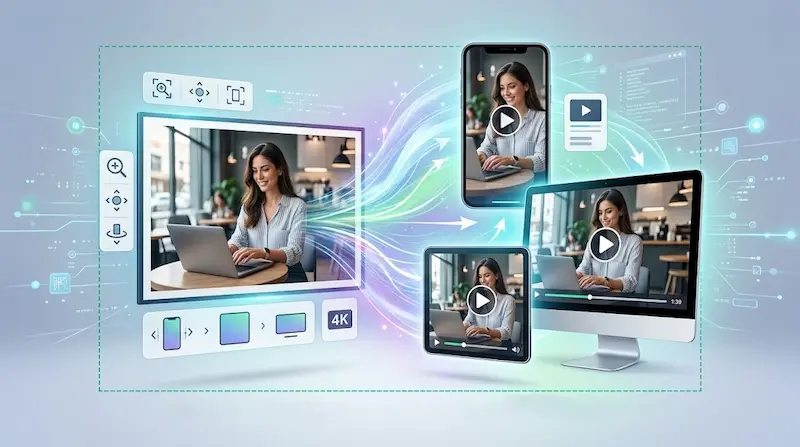
A still image no longer has to stay still. What began as a novelty is turning into a practical production shortcut for creators, marketers, educators, and publishers who need motion without planning a full shoot or learning a complex editing timeline. Major tools now let users start from a single image, add a prompt or motion settings, and generate a short clip from that source material.
That shift matters because motion now carries much of the attention online, especially in vertical feeds, product showcases, explainers, and quick visual recaps. The promise of image-to-video AI is not that it replaces filmmaking. It is that one existing photo, illustration, or graphic can become a usable piece of moving content much faster than a traditional video workflow would allow.
How to choose a photo to video maker
A good photo to video maker should preserve the subject in the original frame, offer basic control over motion and format, and produce clips that are usable without heavy cleanup. The most useful tools are not the ones with the biggest promises, but the ones that can reliably turn one strong image into a short video for an actual publishing need.
In practice, a photo to video maker becomes useful when it reduces friction. On its site, pvid.app presents a workflow built around image-to-video generation, motion control, multiple aspect ratios, multi-photo storyboards, optional audio features, and exports up to 4K, which is the kind of tool stack many teams now look for when they want one workflow instead of several disconnected apps.
What matters most before choosing a tool is usually straightforward:
- Motion control: Can you guide zoom, pan, or camera feel instead of accepting a random result?
- Format fit: Does it support the aspect ratios you actually publish, such as vertical, square, and widescreen?
- Consistency: Does the subject stay recognizable from the first frame to the last?
- Workflow depth: Can you work from one photo, or from several images when a short sequence needs more structure?
- Export quality: Is the output good enough for social posts, product demos, presentations, or web embeds without a second round of repair?
What AI is actually doing when it animates a still image
Under the hood, most image-to-video systems follow a similar logic. The user uploads a source image, adds a prompt or motion instruction, chooses settings such as duration or framing, and lets the model generate a sequence that grows out of that first frame. Some tools also allow an end frame or other controls to shape the movement more precisely. Adobe Firefly documents an image-to-video workflow based on an uploaded image and optional end frame, Google’s Vertex AI documentation describes start and end image inputs for image-to-video, and OpenAI’s Sora allows users to upload an image or video in the initial prompt.
The hard part is not making anything move. The hard part is making motion look coherent. Researchers working on image-to-video systems describe visual consistency, subject integrity, background stability, temporal flickering, and motion smoothness as central problems in the field. In other words, the challenge is getting a clip that feels intentional rather than one that starts strong and then drifts, jitters, or deforms as frames unfold.
Why results vary so much from tool to tool
This is why two platforms can produce very different outcomes from the same image. Better systems usually offer more control over camera motion, stronger first-frame conditioning, and a clearer path from prompt to export. That difference is often more important than raw novelty, because most teams do not need an impressive demo. They need a short clip that is stable enough to publish.
Where image-to-video AI fits in a real workflow
Interest in ai photo to video is growing because the format solves a simple production problem: there is often a strong still image available long before there is time or budget for a custom video shoot. For many teams, turning that existing image into a short motion asset is faster than building a video from scratch, especially when the goal is attention, context, or light visual storytelling rather than a full narrative sequence. On its public product pages, pvid.app positions that workflow around uploaded photos, motion control, multiple durations and aspect ratios, and optional storyboard-style sequences.
That makes the format especially useful for:
- product shots that need subtle movement for ecommerce or ads
- archive or editorial images that can support a recap or explainer
- portrait-based social posts that benefit from camera motion or atmospheric effects
- educational graphics that become easier to follow once motion guides the eye
- quick campaign variants when teams need several short assets from the same source material
A simple workflow that avoids weak results
The best results usually come from restraint, not excess.
- Start with a clean source image. If the original frame is noisy, crowded, or visually confusing, the generated motion often gets worse rather than better.
- Decide what should move. A slow push-in, gentle pan, or background parallax is often more convincing than trying to animate everything at once.
- Match the format to the destination. Choose vertical for reels and shorts, square for feeds, and widescreen for web pages or presentations.
- Generate short first. A five- or ten-second clip is usually enough to test whether the motion feels believable before investing in longer or higher-resolution renders.
- Review faces, hands, text, and logos. These are the places where weak outputs tend to reveal themselves fastest.
What to check before you publish
The main risk is not that the clip looks artificial in some abstract way. It is that small errors become obvious once the image starts moving. A face can subtly change shape, a product edge can wobble, text can become unreadable, or motion can feel mechanically smooth in a way that breaks the illusion. Those problems line up with the consistency and motion issues that researchers continue to measure when evaluating image-to-video systems.
There is also a rights and transparency layer that should not be treated as an afterthought. Some platforms require users to confirm that they have consent from people shown in uploaded media and rights to use that content. Google also uses SynthID technology to watermark AI-generated content and provides a detector for some outputs, reflecting a broader push toward provenance and disclosure. Adobe states that generated outputs can generally be used in commercial projects unless a feature is designated otherwise, which is a reminder to check both platform terms and the rights attached to the original image before publishing.
What is changing, then, is not just the quality of the animation. It is the role of the still image itself. A single frame can now serve as the starting point for a short, platform-ready motion asset. For creators and editorial teams, the practical question is no longer whether AI can animate a picture. It is whether the result is controlled, credible, and useful enough to earn a place in the everyday workflow.
Comentarios