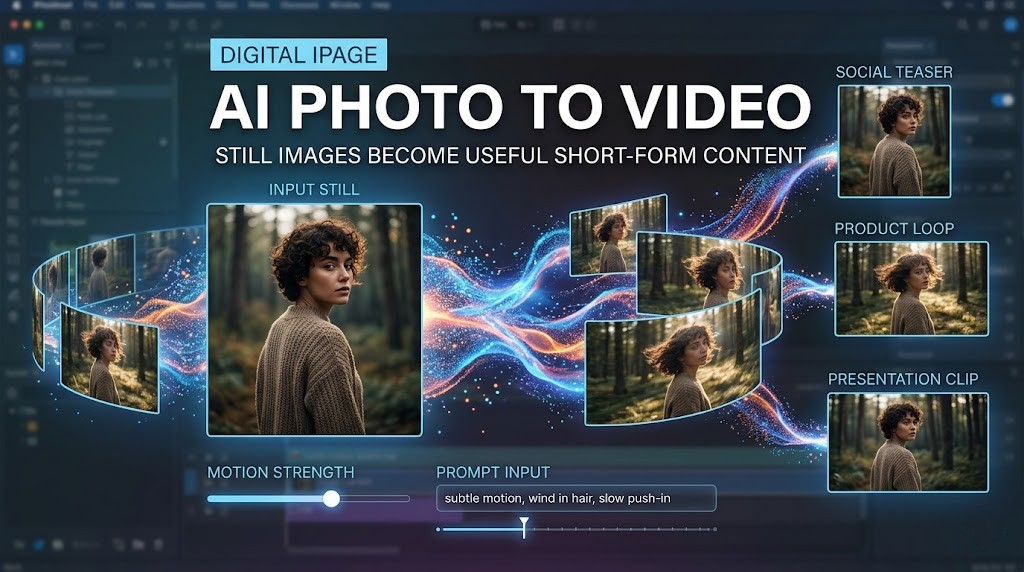
A single photograph used to be the end of the asset. Now, for many teams, it can be the start of a short video. Generative video tools can add camera movement, atmosphere and subtle motion to a still frame, making it easier to adapt existing images for social posts, product pages, presentations and ads. Adobe Firefly, OpenAI’s Sora and Runway all now offer image-led or image-reference video workflows, which shows how quickly this format has moved into everyday creative software.
That matters because the demand for video keeps growing while time, budget and editing capacity do not always grow with it. Turning one strong image into a short clip will not replace filming, but it can extend the life of an asset, help test ideas faster and cover format gaps when a team needs motion without planning a full shoot.
AI photo to video: what it actually does
AI photo to video uses a still image as the visual anchor and then generates motion around it, usually through camera moves, depth simulation, lighting shifts or small subject actions. The best results tend to come from a clear source image, a specific motion prompt and a short output built for a real publishing format.
In simple terms, the system is not just stretching a photograph. It is trying to predict how the scene could move while keeping the original composition recognizable. Some tools keep that process very simple, while others add more control through prompts, camera directions, duration, aspect ratio and downloadable outputs.
Where this tends to work best is in situations like these:
- Turning a product shot into a short ad-ready clip
- Giving a portrait gentle movement for social content
- Adding motion to a landscape or travel image
- Testing video variations before investing in a bigger production
What to look for before choosing a tool
A good photo to video maker should do more than animate a frame. The practical question is whether it gives enough control to match the output to the platform and the purpose of the content.
What usually matters most is not the homepage promise, but the working controls behind it:
- Motion control: You should be able to guide the movement instead of accepting a random animation.
- Format options: A useful tool should fit the destination, whether that means horizontal, vertical or square output.
- Short clip flexibility: For most workflows, a quick five- to fifteen-second asset is more useful than an unnecessarily long sequence.
- Easy export: The result should be simple to download and move into the next editing or publishing step.
- Consistency: If the face, product or main subject drifts too much, the clip stops being useful.
That is why control matters more than novelty. On pvid.app, for example, the interface exposes short durations, common aspect ratios, prompt input and motion settings, while OpenAI’s video documentation highlights image references and reusable character assets as ways to improve consistency across generations.
How to get better results from still images
Most weak outputs start before generation. The source image is doing part of the work. On pvid’s AI Image Animator pages, the platform itself points to the same pattern many creators already notice in practice: portraits with clear subject separation, product shots with clean lighting, and scenic images with visible foreground, midground and background tend to produce more believable motion.
The same rule applies when writing an ai photo to video prompt: be specific about movement, but keep the action realistic enough for the source image.
A better workflow usually looks like this:
- Start with one clear focal subject. A crowded frame gives the model too many things to guess.
- Describe motion, not an entire storyline. “Slow push-in, soft light drift, subtle hair movement” is usually more useful than a dramatic paragraph.
- Keep the movement believable. A still image often works better with a slow pan, a gentle zoom or small environmental motion than with fast action.
- Choose the aspect ratio before generating. A clip made for TikTok or Reels should not be treated the same way as one made for YouTube or a website header.
- Review the output for drift. Watch the edges of faces, hands, objects and text before publishing.
Google DeepMind’s Veo prompt guide explicitly recommends adding detail when you want more control over framing and motion, while Runway’s own prompt material teaches users to think in camera language such as dolly, pan, tracking and crane movement. That is a useful mindset because it forces the prompt to describe what the viewer should actually see.
Where it works especially well
This format is strongest when the goal is to add motion, not to invent an entirely new scene. Product marketing is an obvious case, because a polished still image can become a quick moving asset without reshooting the item. Portrait content also works well when the motion stays subtle and the identity of the subject remains stable. Landscapes and travel images are another natural fit, since slow atmospheric changes often look more convincing than complex human action.
For publishers and content teams, there is also a practical editorial use: one still image can become a teaser clip for social distribution, a small animated visual for a feature page or a lightweight motion asset inside a presentation. That does not make the image more truthful or more informative by itself, but it can make it more adaptable.
Where it still needs human review
The limits appear when the project needs exact continuity, highly detailed action or strict brand accuracy. The more precise the output has to be, the less room there is for generation errors. That is why these tools are usually more reliable for short-form teasers, mood clips, product motion and simple adaptations than for scenes that demand exact realism from start to finish.
In other words, the technology is most useful when it saves production effort without pretending to replace every part of production judgment.
Where this fits in a real workflow
For many teams, the best use of this technology is not to replace shooting but to bridge the gap between an image library and the constant demand for video. A still can become a social teaser, a product loop, a presentation opener or a fast test asset before a larger production.
A practical order of operations is usually enough:
- Pick the strongest still image first
- Decide the platform and aspect ratio
- Choose one motion idea
- Generate a short version before scaling up
- Edit, regenerate or discard based on usability, not novelty
That last point matters. A clip is not successful because it moved. It is successful because the motion served the message, the format and the publishing context.
AI animation from photos is moving from novelty to utility. Teams that treat it as a production shortcut rather than magic usually get the best results. The image matters, the prompt matters, and the publishing decision matters just as much as the tool.
Comentarios